Synchronization report
The Synchronization report provides users with the appropriate roles and permission settings (such as company administrator, or company supervisor) access to information about data synchronization for the EPIC tool, which can be run in ZipSync mode. The report displays whether the data synchronization job is in progress, has completed successfully, or has completed with errors. If the job has completed with errors, you can view a summary of the errors and drill down to view the fields and records that caused them.
Access the Synchronization report:
From the side navigation menu, go to Reports > Synchronization Report.
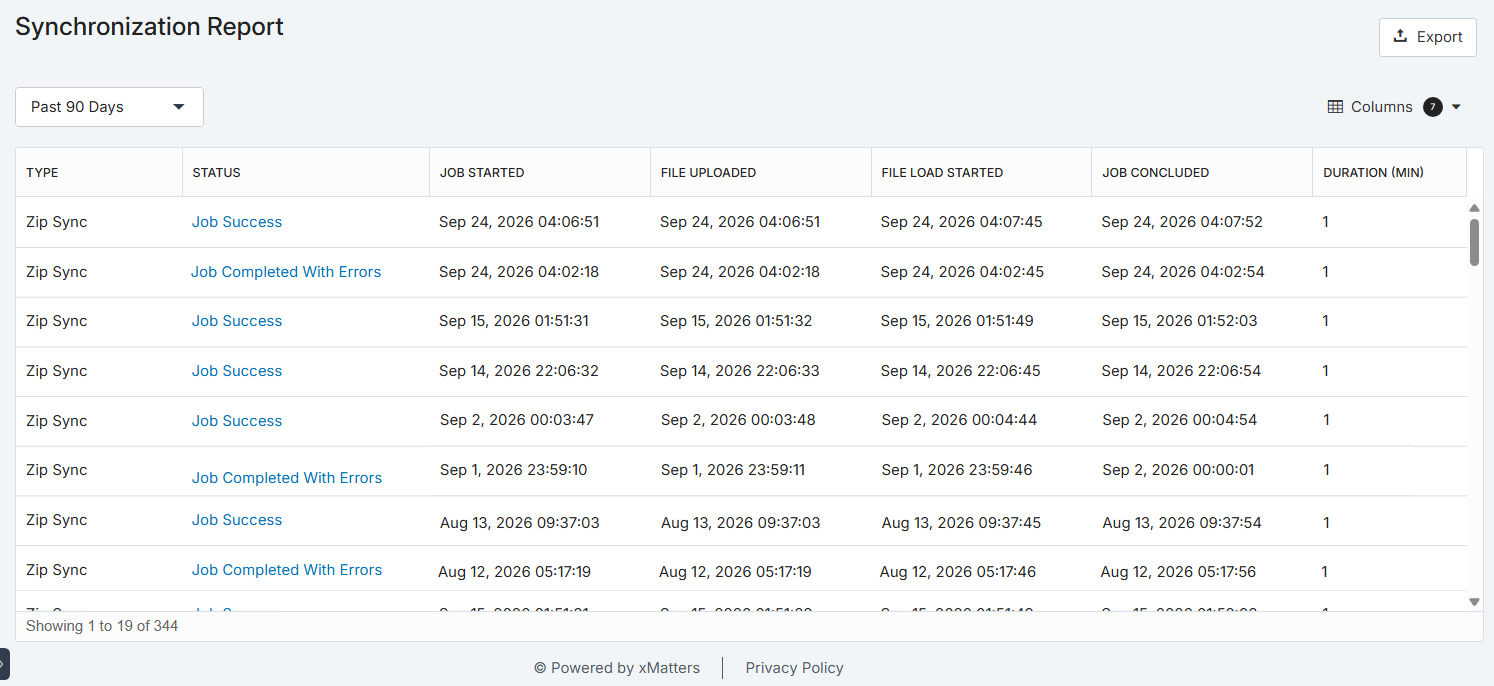
The following sections describe how you can use the Synchronization report.
 Arrange the report
To more easily view data in the table, do one or more of the following:
- To change the width of a column, move the pointer over the edge of the column and when the re-size icon appears, click and drag the column to the desired size.
- If the list contains more entries or columns than can be displayed on your screen, scroll horizontally or vertically. The system automatically loads more data as you scroll down the page.
Available data columns
The Synchronization report includes the following information:
|
Column |
Description |
| Duration |
The length of time (in minutes) it took to complete processing the file. |
| File Load Started |
The date and time when the synchronization process began. |
| File Uploaded | The date and time when the file was uploaded for processing. |
| Job started | The date and time the synchronization job started. |
| Job Concluded | The date and time when the synchronization process finished. |
| Status |
The status of the data synchronization process. For a list of specific status and their definitions, see Job Status. |
| Type |
The type of file uploaded for data synchronization. |
View the report by date
The Synchronization report includes a date selector you can use to view log ins received during a specific timeframe. By default, the report displays Synchronization from the past 90 days, but you can view the report over a variety of past time intervals or over a specific date and time period.
To view Synchronization by date:
- Use the date selector to choose one of the following options:
- Past 24 Hours
- Past 7 Days
- Past 30 Days
- Past 60 Days
- Past 90 Days
- Date Range
- If you selected Date Range, use the calendar and time pickers to select a start and end range of up to 90 days, then click Apply.
Export the report
You can export the contents of the Synchronization report as an .xlsx file. This is useful if you'd like to perform additional analysis on the data.
To export the report:
- Filter the report using the search bar, Columns drop-down, or both. All filters applied to the Synchronization report, such as changing column order, or alphabetically sorting a column, are preserved in the exported file.
- Click Export to download a spreadsheet containing your report data.
Job status definitions
The following table describes the states that may be displayed in the Job Status column of the Synchronization Report. Some states only apply to certain types of jobs; for example, file uploading transforming states do not apply to Data Sync jobs.
| Job Status | Description |
|---|---|
| File Uploading | The ZIP file is being uploaded. |
| File Upload Failed | The ZIP file could not be uploaded, typically because of a network or connectivity issue. |
| File Uploaded | The ZIP file has been successfully uploaded to the server. |
| Job Queued | The job has been queued for processing by xMatters. |
| Job Ignored | The job was ignored and will not be processed; typically this happens because the job was identified as a duplicate of an existing job. |
| File Loading | The ZIP file is being loaded in preparation for processing. |
| File Load Failed | The ZIP file could not be loaded for processing, typically because it contained a formatting or syntax error. |
| Transform Running | The ZIP file is being transformed into the required EPIC-specific format. |
| Transform Failed | The ZIP file could not be successfully transformed into the EPIC format. |
| Delta Running | The data in the job is being compared with the data that already exists in xMatters. |
| Delta Failed | The data comparison returned an error; the job could not be processed successfully. |
| Data Sync Processing | The job is currently being processed, and the data is being added to the system. |
| Job Success | The job completed successfully, and the data has been added to xMatters. |
| Job Completed With Errors | The job completed successfully, but data synchronization errors were reported. (The Job Completed With Errors status is used when there are less than 1000 data synchronization errors. If there are more than 1000 data synchronization errors, the Data Sync Failed status is used instead.) Click the status link to view a Data Synchronization report. |
| Data Sync Failed | The data synchronization failed, typically due to a network or connectivity error. Note that some data may have been added to the system prior to the failure. |