Collaborate across teams
The Collaboration section displays channels the resolution team is using to communicate about the issue. It can include multiple channels — for example, a conference call where stakeholders are discussing business impact and customer communication strategies, a Slack channel where the development team chats about technical mitigation and resolution options, and a Teams channel where the support team and the development team review the latest input from users.
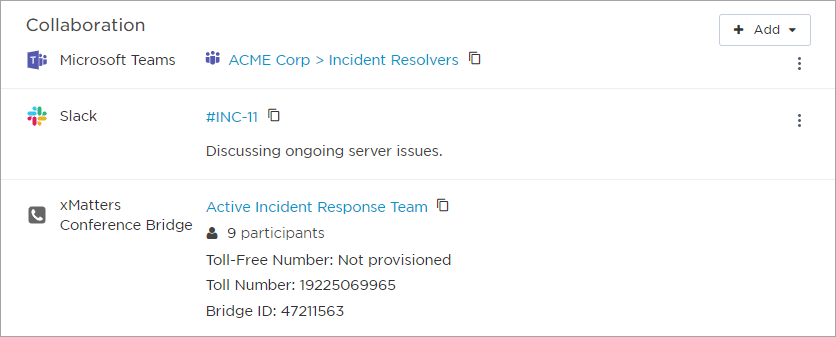
 Access a collaboration channel from the Incident Console
To access a collaboration channel from the Incident Console:
- Click the link for a chat channel to open the channel in the chat app.
- Click the participants count of an xMatters conference bridge to see the names of the participants for that call. If there are more than 10, click View all participants to see the full list on the conference tab. (The Resolvers section displays a phone icon
 next to the names of resolvers who are participating in an xMatters conference bridge for this incident.)
 - To share a channel URL or bridge details, click the copy icon to copy them to your clipboard.
Add collaboration channels to an incident
Collaboration channels can be added to the incident by configuring the incident resolution workflow, initiating an incident from Slack, or from the Incident Console after the incident has been initiated.
If there is already a collaboration channel endpoint connected to the xMatters workflow that initiated the incident, by default the system will use that information when adding a collaboration channel. If no endpoint is connected or there is more than one, you will be prompted to connect to the relevant application before adding a channel. Learn more about how endpoints work in Flow Designer.
Having connection issues? See Troubleshoot collaboration channel connection.
Add collaboration channels automatically
To add a collaboration channel when the incident is initiated, add and configure the steps you need in the associated flow in the incident resolution workflow. See our Incident Resolution workflow guide for instructions on how to do this.
The following steps are currently available:
- Slack Create Channel
- Teams Create Online Meeting
- Create xMatters Conference Bridge
- Zoom Create Meeting
A collaboration channel is also added automatically if you initiate an incident from a public channel in Slack. Learn more about initiating incidents from Slack.
Add collaboration channels after an incident is initiated
For some collaboration types, you can create a new channel or link an existing channel to an incident from the Incident Console. Any user who has access to the Incident Console can add collaboration channels by clicking the + Add drop-down menu in the Collaboration section and selecting the channel you want to add.
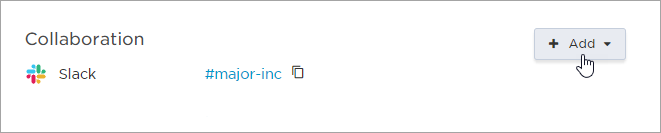
Collaboration channels
The following collaboration channels are currently available:
- Slack
- Microsoft Teams Channel
- Microsoft Teams Meeting
- xMatters Conference Bridge
- Zoom
- Other (generic collaboration channels)
Slack
If your team uses Slack to connect, you can create new or link existing channels or meetings through the Collaboration section of a playbook, using the Slack Create Channel step, or directly on the xMatters Incident Console.
Slack channel
From the Collaboration section on the Incident Console, you can manually add a Slack channel by creating a new channel, searching for a channel, or adding the channel’s URL.
To add a private Slack channel to an incident, select the Make private checkbox when you create a channel. You can also add a private channel’s URL or use the Slack Create Channel step. You can identify private channels added to the incident by a lock icon next to their name:
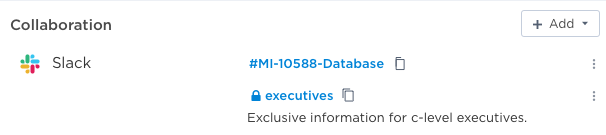
To create a new Slack channel:
- In the Collaboration section, click + Add.
- Select Slack Channel from the drop-down menu.
- Connect to your company's workspace by clicking Connect:
- Select Create new channel.
- Type the Channel Name. The name must be unique in your Slack workspace. To ensure channel names are unique, we recommend adding the Incident ID variable to your channel name.
- Select the Make private checkbox if you want to create a private Slack channel.
- Add an optional description. (This description is displayed in the xMatters Incident Console.)
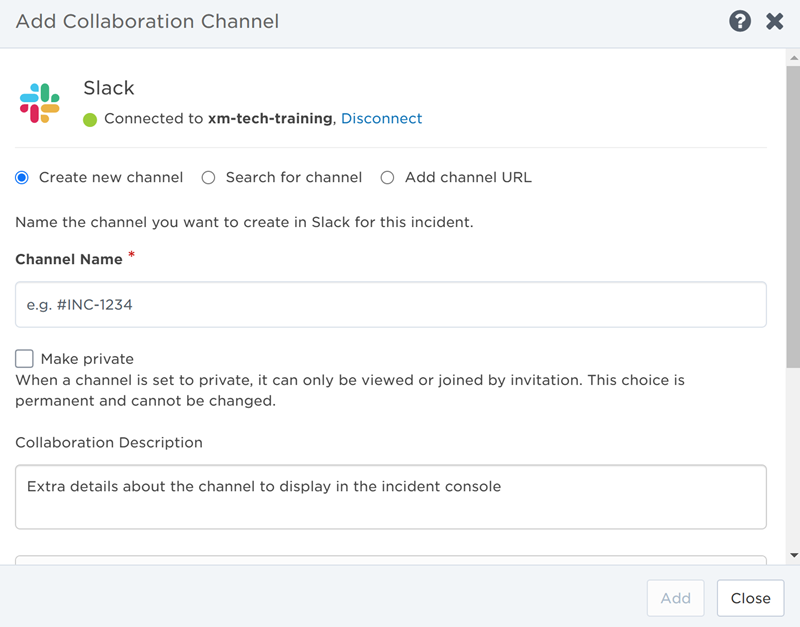
- Select updates about the incident you want posted to this Slack channel. For more information, see Post incident updates to collaboration channels.
- Click Add.
To link an existing Slack channel:
- In the Collaboration section, click + Add.
- Select Slack Channel from the drop-down menu.
- If you're not already connected to your company's workspace, click Connect.
- Select one of the following:
- Search for channel: Type the name of an existing channel and select it from a list of available channels that appears.
- Add channel URL: Provide the URL of an existing Slack channel and give it a name to display in the Incident Console.
- Include an optional description. (This is displayed in the xMatters Incident Console.)
- Select updates about the incident you want posted to this Slack channel. For more information, see Post incident updates to collaboration channels.
- Click Add.
Microsoft Teams
If your team uses Teams to connect, you can create new or link existing channels or meetings through the Collaboration section of a playbook, using Microsoft Teams steps, or directly on the xMatters Incident Console. If both Teams channels and meetings are linked to the incident, the two types of collaborations can be clearly identified by the display icons that will be familiar to most Teams users:
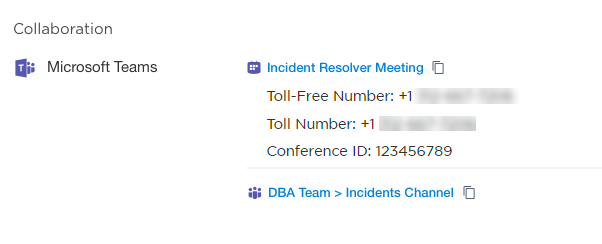
If specific information (such as the Conference ID) is included when the Create Online Meeting step is executed, it will display under the Microsoft Teams meeting in the Collaboration section of the Incident Console.
Microsoft Teams channel
Channels in Microsoft Teams allow you to connect with other members within your team through chat channels organized by specific topics, projects, or disciplines. You can create new Teams channels, search for channels, or link existing channels through the xMatters Incident Console.
To create a new Teams channel:
- In the Collaboration section, click + Add.
- Select Teams Channel from the drop-down menu.
- Connect to your company's workspace by clicking Connect:
- Select Create new channel.
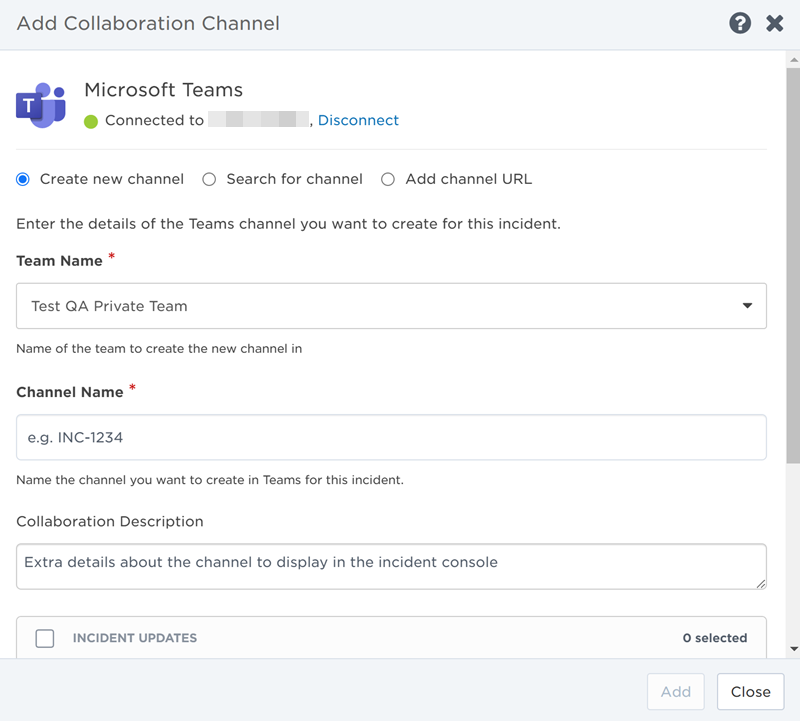
- Search and select the team you want to create the new channel in by typing the name of the team into the search bar.
- Type the Channel Name and add an optional description. (This description is displayed in the xMatters Incident Console.)
- Select updates about the incident you want posted to this Teams channel. For more information, see Post incident updates to collaboration channels.
- Click Add.
To link an existing Teams channel:
- In the Collaboration section, click + Add.
- Select Teams Channel from the drop-down menu.
- If you're not already connected to your company's workspace, click Connect.
- Select one of the following:
- Search for channel: Type the name of an existing team and channel and select them from the list of available options that appears
- Add channel URL: Provide the URL of an existing Teams channel and give it a name to display in the Incident Console.
- Include an optional description. (This is displayed in the xMatters Incident Console.)
- Select updates about the incident you want posted to this Teams channel. For more information, see Post incident updates to collaboration channels.
- Click Add.
Microsoft Teams meeting
Meetings in Microsoft Teams allow you to collaborate with other resolvers through audio, video, and screen sharing. You can create new Teams meetings or link existing ones through the xMatters Incident Console.
To create a new Teams meeting:
- In the Collaboration section, click + Add.
- Select Teams Meeting from the drop-down menu.
- Connect to your company's workspace by clicking Connect.
- Select Create New Meeting.
- Type the Meeting Name and add an optional description. (This description is displayed in the xMatters Incident Console.)
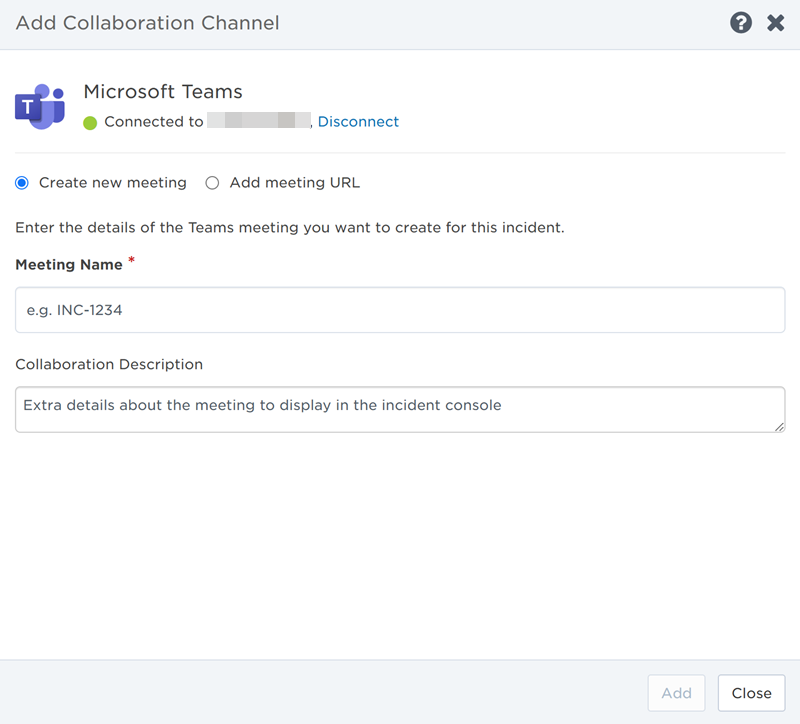
- Click Add.
To link an existing Teams meeting:
- In the Collaboration section, click + Add.
- Select Teams Meeting from the drop-down menu.
- If you're not already connected to your company's workspace, click Connect.
- Select Add Meeting URL.
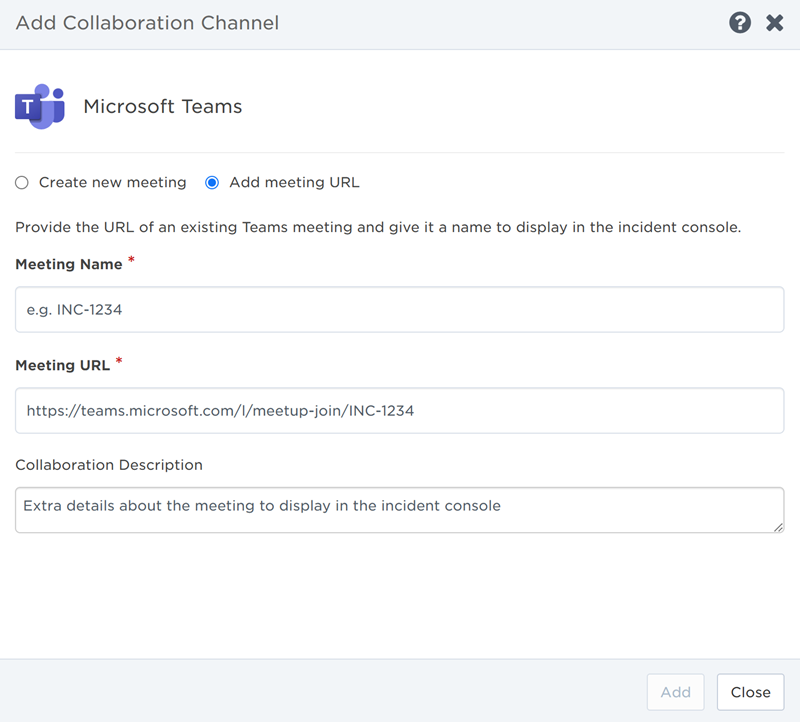
- Type the Meeting Name. (This is displayed in the Incident Console and doesn't need to match the meeting name in Teams.)
- Add the URL of the existing Teams meeting you want to link to the incident.
- Include an optional description. (This is displayed in the xMatters Incident Console.)
- Click Add.
xMatters Conference Bridge
If resolver teams need to connect over a conference call, xMatters-hosted bridges can be added or linked directly through the Incident Console of an active incident.
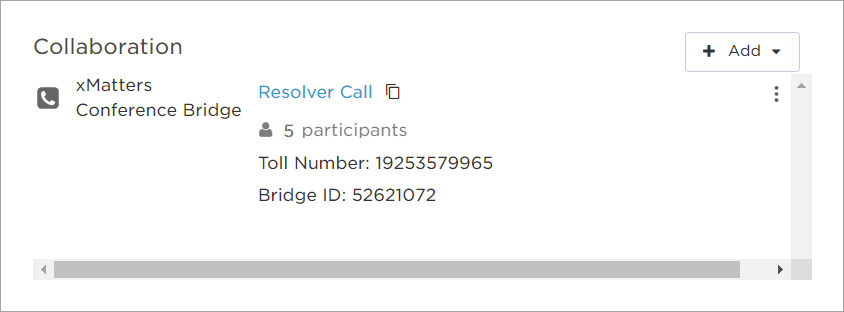
xMatters Conference Bridge
To create a new xMatters conference bridge:
- In the incident's Collaboration section, click + Add.
- Click xMatters Conference Bridge in the drop-down menu.
- Select Create new bridge.
- Type the Bridge Name and add an optional Collaboration Description. (This will only be visible in the xMatters Incident Console.)
- Click Add.
To link an existing xMatters conference bridge:
- In the incident's Collaboration section, click + Add.
- Click xMatters Conference Bridge in the drop-down menu.
- Select Link existing bridge.
- Search and select the xMatters conference bridge you want to link by typing the name of the bridge into the search bar:
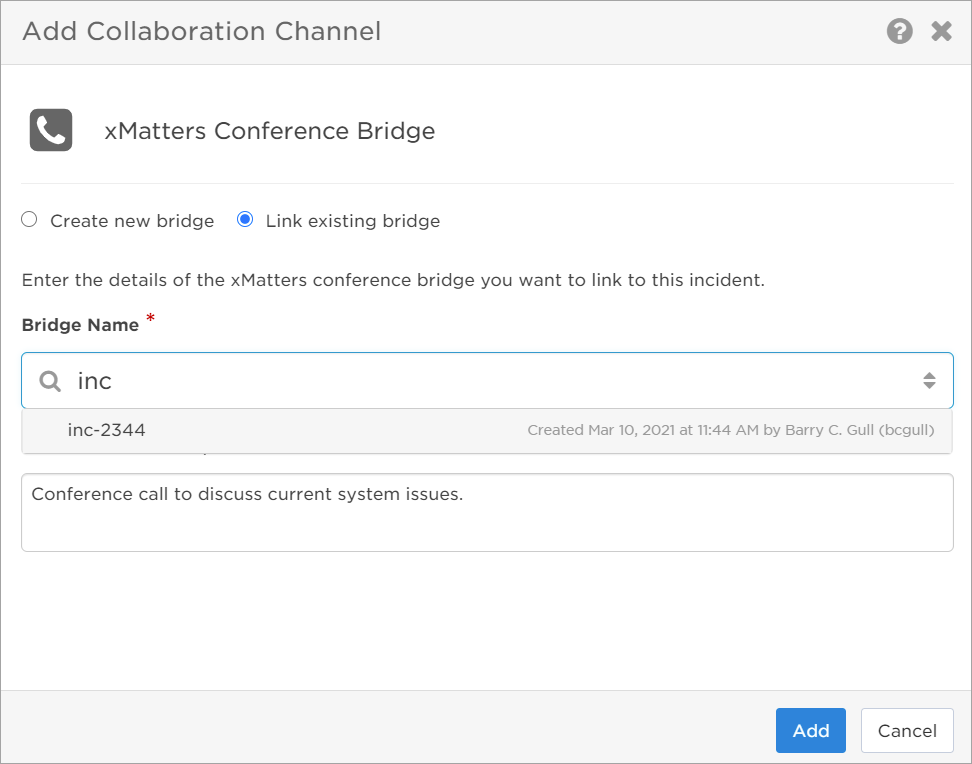
- Include an optional Collaboration Description. (This will only be visible in the xMatters Incident Console.)
- Click Add.
Zoom
Adding a Zoom collaboration allows resolution teams to quickly connect and discuss issues over Zoom meetings. Anyone with access to the Incident Console can create a new meeting, or link a scheduled or existing meeting to the incident by adding it through the Collaboration section.
Zoom meeting
To create a new Zoom meeting:
- In the incident's Collaboration section, click + Add.
- Click Zoom meeting in the drop-down menu.
- Select Create new meeting.
- Connect to your company's workspace by clicking Connect:
- Type the Meeting Topic and add an optional Collaboration Description. (This will only be visible in the xMatters Incident Console.)
- Click Add.
To link an existing Zoom meeting:
- In the incident's Collaboration section, click + Add.
- Click Zoom meeting in the drop-down menu.
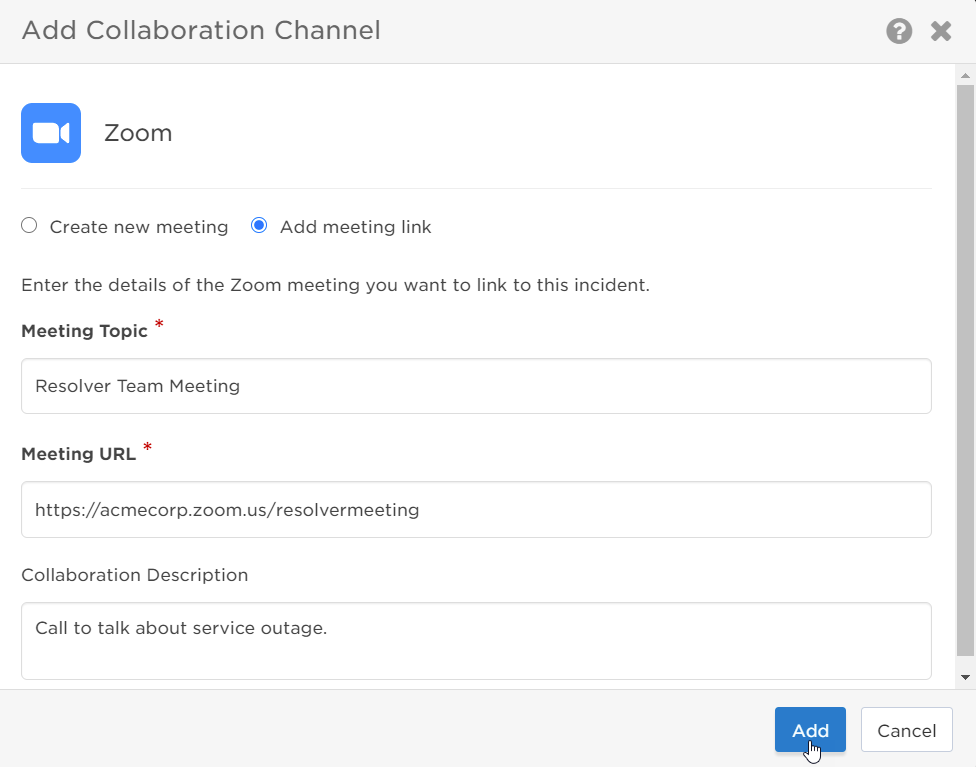
- Select Add meeting link.
- Type the Meeting Topic. (This is displayed in the Incident Console and doesn't need to match the meeting topic in Zoom.)
- Add the URL of the existing Zoom meeting you want to link to the incident.
- Include an optional Collaboration Description. (This will only be visible in the xMatters Incident Console.)
- Click Add.
Zoom may limit the number of scheduled or concurrent meetings, participant capacity, or meeting duration.
Other collaborations
If your team uses a collaboration channel that isn't currently listed in xMatters, you can manually add an existing chat room, online conference call, or other communication platform to the incident by linking its URL. Once the channel is added, resolvers can easily access the channel through the xMatters Incident Console by clicking the link.
Other channels
To add an Other channel:
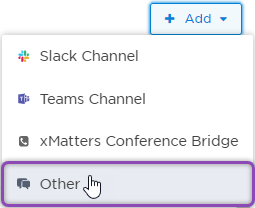
- In the incident's Collaboration section, click + Add.
- Click Other in the drop-down menu:
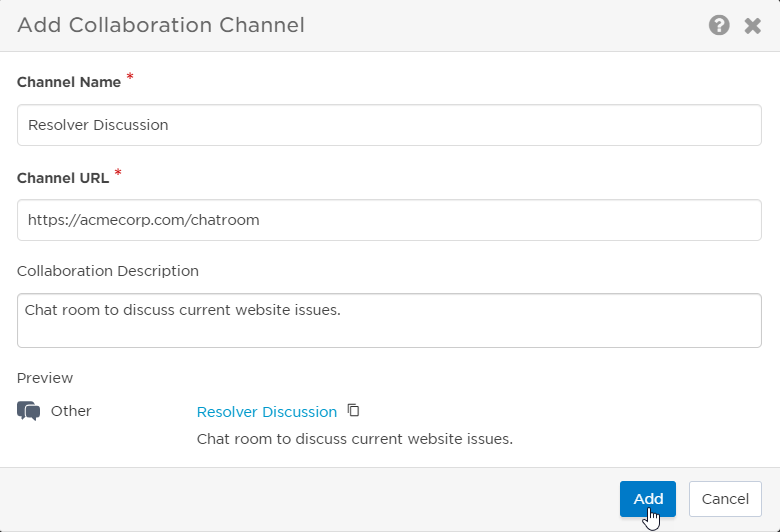
- Type the Channel Name. (This is displayed in the Incident Console and doesn't need to match the actual channel name.)
- Add the Channel URL of the existing collaboration channel you want to link to the incident.
- Include an optional Description. (This will only be visible in the xMatters Incident Console.)
- Click Add.
Edit collaboration channels
If the details of a collaboration channel change or need updating during an ongoing incident, you can ensure the information is always accurate by editing the name, URL, or details of a channel through the Incident Console.
Edit a collaboration channel
To edit a collaboration channel:
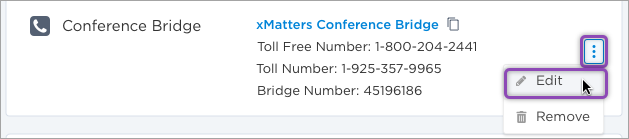
- Under the Incident Console's Collaboration section, click the drop-down menu next to the channel you want to edit.
- Select Edit:
- Update the Channel Name, Channel URL, or Collaboration Details.
- If you're updating the URL, make sure to use the same type of collaboration channel (for example, a Slack URL for a Slack collaboration channel) as the channel type and icon cannot be updated in the Incident Console. If you need to change the collaboration channel type, remove the channel and create a new one.
- For xMatters Conference Bridges, links are created automatically and cannot be edited.
- Click Save.
Collaboration channels created by a flow can only be edited in Flow Designer. See our Incident Resolution workflow guide for instructions on how to do this.
Post incident updates to collaboration channels
You can configure updates about an incident to be posted to a Slack channel or Microsoft Teams channel. This feature is only available if you're adding a channel or search for an existing channel and not if you manually provide a channel URL.
Post incident updates
To post incident updates to a collaboration channel:
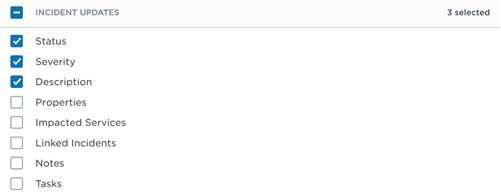
On the configuration screen of the collaboration channel, select updates about the incident you want posted to the channel. When a change occurs to a selected update type for this incident, it will be posted as a message to the channel. The available update types are:
- Status
- Severity
- Description
- Properties
- Impacted Services
- Linked Incidents
- Notes
- Tasks
If you're having issues configuring the channel to post incident updates, see Troubleshoot collaboration channel connection.
Remove collaboration channels from an incident
If a collaboration channel is no longer relevant to an incident, or it was added in error, you can remove it from the Incident Console so resolvers don't become confused about where to connect and collaborate. Removing a collaboration channel from the Incident Console does not delete it, so you can add it again or link it to another incident later.
Remove a collaboration channel
To remove a collaboration channel:
- Under the Incident Console's Collaboration section, click the drop-down menu next to the channel you want to remove.
- Select Remove:
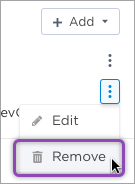
- When the confirmation screen appears, click Remove.
Troubleshoot collaboration channel connection
This section lists common issues when connecting to a Slack workspace or Teams tenant or setting up a collaboration channel to post incident updates, and explains how to resolve them.
Common issues and resolution steps
I'm already connected to a Slack workspace or Teams tenant but the channel configuration screen still displays this error: To receive incident updates in this channel, connect to the chat app instance it belongs to.
Your collaboration channel endpoint is connected to a different workspace or tenant from the one that the channel belongs to. To enable incident updates, you need to connect to a new endpoint from an Add Collaboration Channel configuration screen. If you change your endpoint, other collaboration channels in your xMatters instance using the old endpoint will no longer be able to post incident updates.
If you don't want to post incident updates to the channel, you can ignore this error.
I clicked 'Change connection' but got this error: Unable to change connection. Make sure that your endpoint is configured for this channel then try again, or contact Support if the problem persists.
Changing a connection only updates the credentials for the same Slack workspace or Teams tenant. If you get this error, you're attempting to connect to a different workspace or tenant from the one your collaboration channel endpoint is connected to. To resolve this, you need to connect to a new endpoint from an Add Collaboration Channel configuration screen. If you change your endpoint, other collaboration channels in your xMatters instance using the old endpoint will no longer be able to post incident updates.