Alert activity triggers
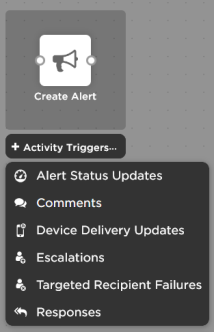
Alert activity triggers kick off flows based on different alert lifecycle activities, including alert status updates, device delivery updates, responses, alert comments, escalations, and targeted recipient failures. Each of these different triggers include a common set of alert properties, and additional properties specific to the type of alert activity.
 Add activity triggers to the canvas
Activity triggers are associated with an xMatters alert. Depending on if you use a Create Alert step or a messaging form to create the alert, you access these triggers from different places in Flow Designer. Each alert activity trigger can only be used once, so when you add one of these triggers to the canvas, it disappears from the list of options; when you remove it from the canvas, it reappears and is available for you to use again.
Create Alert step
You can add activity triggers to the Create Alert step by clicking + Activity Triggers below the step on the canvas.
Messaging forms
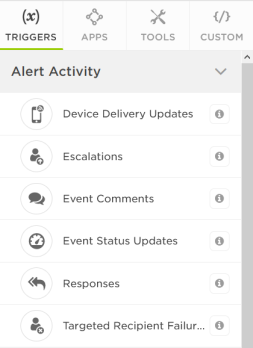
When you add a messaging form to your workflow, xMatters automatically creates a flow canvas with the same name as the form. Activity triggers for alerts created by the form are available on the Triggers tab of the palette for the associated form. If you've already built an outbound integration with the Integration Builder that uses the trigger, it appears on the canvas.
The Alert Activity section only appears in the palette of canvases associated with a messaging form.
How do I add activity triggers for alerts created by the Create Alert Using a Form step?
When you add a Create Alert Using a Form step to your flow, you select which messaging form to use for the alert. Alert Activity triggers for these alerts are available on the flow canvas associated with the selected messaging form.
Common properties
Alert activity triggers share a common set of properties outputs with details about the alert at the time the trigger fired. You can use these outputs to pass current alert details to steps further along in your flow.
Different common properties are available depending on if you use a Create Alert step or a messaging form to create the alert.
Create Alert step - Common trigger output details
| Property | Description | Example |
|---|---|---|
| alert.id | The unique identifier (UUID) of the alert. | e930e32d-b863-4c55-a528-1d2829e3690e |
| alert.alertId | ID assigned to this alert by xMatters and used to track its progress through the system. (Also the number used to reference this alert in the Alerts and Tracking reports.) | 889003 |
Messaging form - Common trigger output details
| Property | Description | Example |
|---|---|---|
| event.id | The unique identifier (UUID) of the alert. |
e930e32d-b863-4c55-a528-1d2829e3690e |
| event.eventId | ID assigned to this alert by xMatters and used to track its progress through the system. (Also the number used to reference this alert in the Alerts and Tracking reports.) | 889003 |
| event.status | The current status of the alert. | ACTIVE |
| event.created | Date and time the alert was created in xMatters in ISO-8601 format. | 2019-01-15T18:03:16.580Z |
| event.priority | The priority assigned to the notification in xMatters (LOW, MEDIUM, or HIGH). | HIGH |
| event.targetedRecipients | The recipients targeted for notification. |
bjones mmcbride|Work Email CustomerCare |
| event.initiator | The target name of the user who initiated the alert. | integrationUser |
| event.properties | A JavaScript object containing the property names and values included in the alert. |
|
Alert activity triggers
- Alert status updates
- Device delivery updates
- Responses
- Comments
- Escalations
- Targeted recipient failures
Alert Status Updates trigger
The Alert Status Updates trigger initiates a flow when an alert is started, suspended, resumed, or terminated. Outputs include the status of the alert and the user who initiated the alert status change.
Alert status updates trigger
Examples of when to use this trigger:
- Automatically update the record in your monitoring tool to add an annotation that the xMatters alert ended.
- Post alert creation and termination updates to your reporting repository for analytics and observability initiatives.
- Automatically close the ticket in the source system when the xMatters alert ends.
Alert status trigger outputs
| Property | Description | Example |
|---|---|---|
| statusChanged.auditType | The change to the alert status that triggered the flow. Can be one of: EVENT_ANNOTATED, EVENT_COMPLETED, EVENT_CREATED, EVENT_RESUMED, EVENT_SUSPENDED, or EVENT_TERMINATED | EVENT_TERMINATED |
| statusChanged.at | Date and time the alert status changed in ISO-8601 format. | 2019-01-15T18:03:16.580Z |
| statusChanged.by.id | The unique identifier (UUID) of the user who initiated the alert or changed the alert status, or null if it happened automatically (for example, by timeout). | e1e427bb-770f-4d47-aa4d-efdd8b64089c |
| statusChanged.by.targetName | The username of the user who initiated the alert or changed the alert status. | mmcbride |
| statusChanged.by.firstName | First name of the user who initiated the alert or changed the alert status. | Mary |
| statusChanged.by.lastName | Last name of the user who initiated the alert or changed the alert status. | McBride |
To see the payload behind the scenes, see the information for the equivalent trigger in the Integration Builder.
Device Delivery Updates trigger
The Device Delivery Updates trigger initiates a flow when a notification is delivered to a device, or when notification delivery fails. Outputs include the user and device that the message was sent to and whether the delivery was successful.
Device delivery updates trigger
Examples of when to use this trigger:
- Post details about who was notified and when into a ticket, alert, or chat application so the notification process is clearly visible (and documented).
- Post details about device notification failures to a list so you can follow up with users who seem to be experiencing delivery issues.
Device delivery trigger outputs
| Property | Description | Example |
|---|---|---|
| notification.deliveryStatus | The delivery status: Delivered, Failed, or Unchanged. | Delivered |
| notification.recipient.alertContext | The alerting path followed to notify the recipient. | Antares Service Support > Weekday AM |
| notification.recipient.id | The unique identifier (UUID) of the device the notification was sent to. | f51d0fa3-6712-4b4e-9da4- b8a631f8b8c1 |
| notification.recipient.name | The name of the device the notification was sent to. | Work Email |
| notification.recipient.targetName | The target name of the device the notification was sent to. | mmbride | Work Email |
| notification.recipient.owner.id | Unique identifier (UUID) of the targeted user. | e1e427bb-770f-4d47-aa4d- efdd8b64089c |
| notification.recipient.owner.firstName | First name of the targeted user. | Mary |
| notification.recipient.owner.lastName | Last name of the targeted user. | McBride |
| notification.recipient.owner.targetName | Username of the device's owner. | mmcbride |
| deliveryStatusUpdated.at | Date and time the delivery status was updated in ISO-8601 format. | 2019-01-15T18:03:16.580Z |
| deliveryStatusUpdated.auditType | The general category of the device delivery attempt that triggered the flow. Can be one of: NOTIFICATION_DELIVERED, NOTIFICATION_ESCALATED, NOTIFICATION_FAILED, NOTIFICATION_NO_RECIPIENT, or NOTIFICATION_UNCHANGED | NOTIFICATION_DELIVERED |
| deliveryStatusUpdated.delivery StatusType |
The detailed result or status of the delivery attempt that triggered the flow. A detailed list of delivery status types is available. | LIVE_NOTIFICATION_ PROVIDER_DELIVERED |
| deliveryStatusUpdated.delivery StatusMessage |
A description of the result of the delivery attempt, which may include error codes. | Notification delivered |
To see the payload behind the scenes, see the information for the equivalent trigger in the Integration Builder.
Responses trigger
The Responses trigger initiates a flow when a user responds to a message. Outputs include the user and device that made the response, their response choice, and comments added from the mobile app.
Responses trigger
Examples of when to use this trigger:
- Automatically assign an incident when a recipient responds with Accept (or Assign to me or whatever response you have configure for this).
- Approve or reject change requests based on responses.
Responses trigger outputs
| Property | Description | Example |
|---|---|---|
| response.response | The response the recipient selected. | Assign to me |
| response.deviceName | Name of the device the recipient used when responding to the notification. | Android Phone |
| respondedTo.at | Date and time the recipient responded to the notification in ISO-8601 format. | 2019-01-15T18:03:16.580Z |
| respondedTo.by.alertContext | The alerting path followed to notify the recipient. | Antares Service Support > Weekday AM |
| respondedTo.by.targetName | Username of the person who responded. | asamara |
| respondedTo.by.id | The unique identifier (UUID) of the recipient who responded to the notification. | 871d855c-1cce-45a2-97e7-f185f51ed753 |
| respondedTo.by.firstName | First name of the person who responded. | Ali |
| respondedTo.by.lastName | Last name of the person who responded. | Samara |
| respondedTo.auditType | The system action that triggered the flow (RESPONSE_RECEIVED) | RESPONSE_RECEIVED |
To see the payload behind the scenes, see the information for the equivalent trigger in the Integration Builder.
Configure a responses trigger
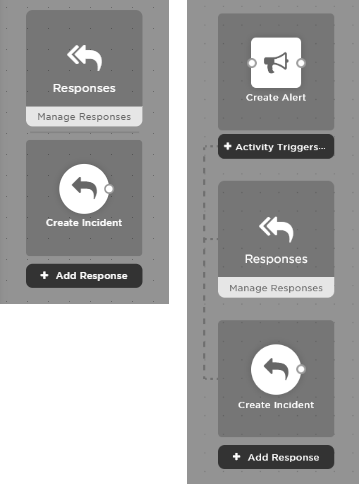
To use the responses trigger, you need the individual response options that you want to trigger flows. If response options are already configured on the messaging form, or were previously configured for a Create Alert step, they appear under the parent trigger when you add it to the canvas:
If there are no response options, you can add them right from within Flow Designer:
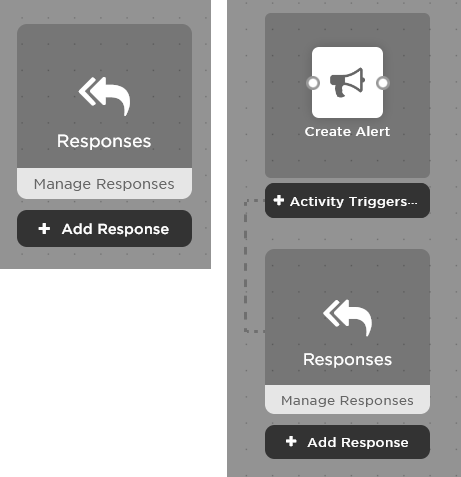
To add response options to a Responses trigger:
- Click + Add Response (or double-click the Responses parent) to add, remove, or edit response options.
- Configure the response options and drag them into the order you want them to appear on the canvas, then click Save. In our MIM scenario, we added "Create major incident" and moved it to the top of the list.
- For more information, see Create Alert step - Configure response options.
- For more information, see Define response options for messaging forms.
Each response appears as a step on the canvas. You can now connect the steps you want to run when a recipient selects that response.
A few things to know about existing integrations:
- If you have an outbound integration that uses the Notification Responses trigger, it appears on the canvas but doesn't have the response options delineated since any actions based on different responses are handled in the outbound integration script.
- Some integrations use response options that are determined at runtime. We've updated our built-in integrations but some packaged or custom integrations still use these. For the time being, you'll need to continue to use an outbound integration using the Notification Responses trigger.
- For built-in integrations, you are unable to modify or delete the default response options included in the configuration; although you can add additional ones. To modify or delete built-in responses, you'll need to first convert the configuration to a workflow.
Comments trigger
The Comments trigger initiates a flow when a user adds a comment from the mobile app, xMatters Inbox, email, Tracking Report, or xMatters REST API. Outputs include the user that made the comment and the content of their comment.
Comments trigger
Examples of when to use this trigger:
- Post each comment to a Slack channel or another chat application.
- Populate the free-form text closure details of a ticket or alert (in this case, you could actually perform your response logic in the Alert Comment trigger instead of the response trigger!)
- Add the comments to a ticket or alert as annotations, recording the work performed on the alert, either for the next person in the resolution chain or for post-incident analysis.
Comments trigger output details
| Property | Description | Example |
|---|---|---|
| annotation.comment | The value of the comment added to the alert by the user. | Investigating the root cause now |
| annotated.at | Date and time the comment was added in ISO-8601 format. | 2019-01-15T18:03:16.580Z |
| annotation.author.targetName | The username of the user who added the comment. | asamara |
| annotation.author.id | The unique identifier (UUID) of the user who added a comment. | 871d855c-1cce-45a2-97e7-f185f51ed753 |
| annotation.author.firstName | First name of the user who added the comment. | Ali |
| annotation.author.lastName | Last name of the user who added the comment. | Samara |
| annotation.response.response | The response the user selected when they added a comment, or null if they commented without selecting a response. | Assign to me |
To see the payload behind the scenes, see the information for the equivalent trigger in the Integration Builder.
Escalations trigger
The Escalations trigger initiates a flow when an escalation occurs in a group. Outputs include the group containing the shift with the escalation, the reason for the escalation, the user that escalated the alert (if it was escalated manually), the type of escalation, the recipients the alert escalated from, and the recipients the alert escalated to.
Escalations trigger
Examples of when to use this trigger:
- Automatically launch a new alert that warns a manager when an alert has escalated to the point where an SLA (service level agreement) is in jeopardy.
- Automatically update a chat room to warn team members when an alert is escalated.
Escalation trigger outputs
| Property | Description | Example |
|---|---|---|
| escalation.reason | Whether the escalation was triggered by an application or a person (ACTIVE) or by a timeout (PASSIVE). | ACTIVE |
| escalation.escalationType | The type of escalation: PEER, MANAGEMENT, or NONE | PEER |
| escalated.at | Date and time of the escalation in ISO-8601 format. | 2019-01-15T18:03:16.580Z |
| escalated.by.id | For active escalations, the unique identifier (UUID) of the recipient whose response manually escalated the alert. | e1e427bb-770f-4d47-aa4d-efdd8b64089c |
| escalated.by.targetName | For active escalations, the username of the recipient who manually escalated the alert. | mmcbride |
| escalated.by.firstName | For active escalations, the first name of the recipient who manually escalated the alert. | Mary |
| escalated.by.lastName | For active escalations, the last name of the recipient who manually escalated the alert. | McBride |
| escalation.group.id | Unique identifier (UUID) of the group in which the escalation occurred. | afd56311-86cd-476f-a6ae-51e3d8cadbe0 |
| escalation.group.targetName | The name of the group in which the escalation occurred. | Deneb Service Team |
| escalation.group.status | The status of the group in which the escalation occurred. | ACTIVE |
| escalation.from | An array containing the id (UUID), recipientType, status, and targetName of each recipient at the escalation level from which the escalation occurred. Devices are reported as a person recipient type, corresponding to the device's owner. | c68bfa2f-4539-40a9-9e96- 185b7ecde7ff mmcbride PERSON |
| escalation.to | An array containing the id (UUID), recipientType, status, and targetName of each recipient at the escalation level to which the escalation occurred. Devices are reported as a person recipient type, corresponding to the device's owner. | 98555e21-b7ff-479e-a264- 3e96815fb03d NOC GROUP |
To see the payload behind the scenes, see the information for the equivalent trigger in the Integration Builder.
Targeted Recipient Failures trigger
The Targeted Recipient Failures trigger initiates a flow when none of the targeted recipients could be immediately notified for an alert. Outputs include the type of failure, the first 100 targeted recipients, and the total number of targeted recipients.
Targeted recipient failures trigger
Examples of when to use this trigger:
- Automatically notify a chat room that an alert isn’t currently routing to on-call resources.
Targeted recipient failures trigger output details
| Property | Description | Example |
|---|---|---|
| targeted.triggerType | The type of targeting attempt for which no recipients could be notified: INITIAL_EVENT, TIMED_ESCALATION, or MANUAL_ESCALATION | TIMED_ESCALATION |
| targetingFailed.at | Date and time of the targeting failure in ISO-8601 format. | 2019-01-15T18:03:16.580Z |
| targeted.totalRecipients | The total number of targeted recipients. | 35 |
| targeted.recipients | An array containing the id (UUID), recipientType, status, and targetName of each recipient (up to the first 100 targeted recipients). Invalid recipients are returned with a status of "INVALID". | f51d0fa3-6712-4b4e-9da4-b8a631f8b8c1 DEVICE ACTIVE mmcbride|Work Email |
To see the payload behind the scenes, see the information for the equivalent trigger in the Integration Builder.